Key takeaways
- If you lost money, contact your bank, card issuer, payment app or wire service first and ask them to reverse the payment before filing any government report.
- Forward scam texts to 7726 and use Report Junk on iPhone or Block and Report spam in Google Messages so carriers can block the sender.
- File online crime reports with the FBI at complaint.ic3.gov and scam reports at ReportFraud.ftc.gov, and keep every confirmation number.
In this story 6 sections
You got a strange text about a package, a caller claiming to be from your bank, or you already sent money to someone who vanished. Knowing how to report a scam in the US matters because the right report goes to the people who can block the number, freeze a payment or open a case. This guide is for anyone in the US dealing with a scam text, call, email, website or lost payment. Most reports take 5 to 15 minutes each. If you lost money, plan on an hour, because the first call to your bank matters more than any form.
Before you start
Gather what you have before you open a single form. Agencies ask for the same details, and having them in one place saves time.
- Screenshots of texts, emails, social media messages and the scam website, including the full web address
- Phone numbers: the number that called you, the number on your caller ID and any callback number the scammer gave you
- Dates and times of each contact, as exact as you can
- Payment records: receipts, bank or card statements, transaction IDs, gift card numbers and the cards themselves, crypto wallet addresses
- Names and usernames the scammer used, even if they look fake
Do not delete the messages yet. Report first, then clean up.
Stage 1: If you lost money, call the payment company first
Money moves fast, so this comes before any government report. The FTC's guide on what to do if you were scammed says to contact the company you used to pay right away and ask if the payment can be reversed.
- Credit or debit card: call the number on the back of your card, or report it in your bank's app. Ask the issuer to reverse the charge.
- Zelle or a bank transfer: report it to your bank or credit union immediately and ask them to reverse the payment.
- Payment apps such as Venmo, Cash App or PayPal: report it inside the app and ask for a reversal.
- Wire transfer through a service like Western Union or MoneyGram: call the wire company, tell them a scammer tricked you and ask for a refund.
- Gift cards: call the number on the back of the card. Tell the issuer the scammer has the card number and PIN. Keep the card and the receipt.
- Cryptocurrency: contact the exchange or crypto ATM operator and ask them to reverse the transaction. The FTC warns that crypto payments lack the legal protections of cards, so recovery is hard. Our guide on how to spot a crypto scam covers the warning signs for next time.
- Cash sent by US mail: call the US Postal Inspection Service at 1-877-876-2455. For a fee, they may be able to intercept a domestic package that has not been delivered yet.
If you gave a scammer your password, change it now and turn on two factor authentication. If they got your Social Security number, go to IdentityTheft.gov, the FTC's site that builds a personal recovery plan.
Stage 2: Report scam texts and calls on your phone
These reports help carriers and phone makers block the same sender for everyone else.
Forward scam texts to 7726
- Copy the scam text.
- Forward it to 7726 (it spells SPAM on a keypad). The FTC says this helps your wireless provider spot and block similar messages.
Report junk in your messaging app
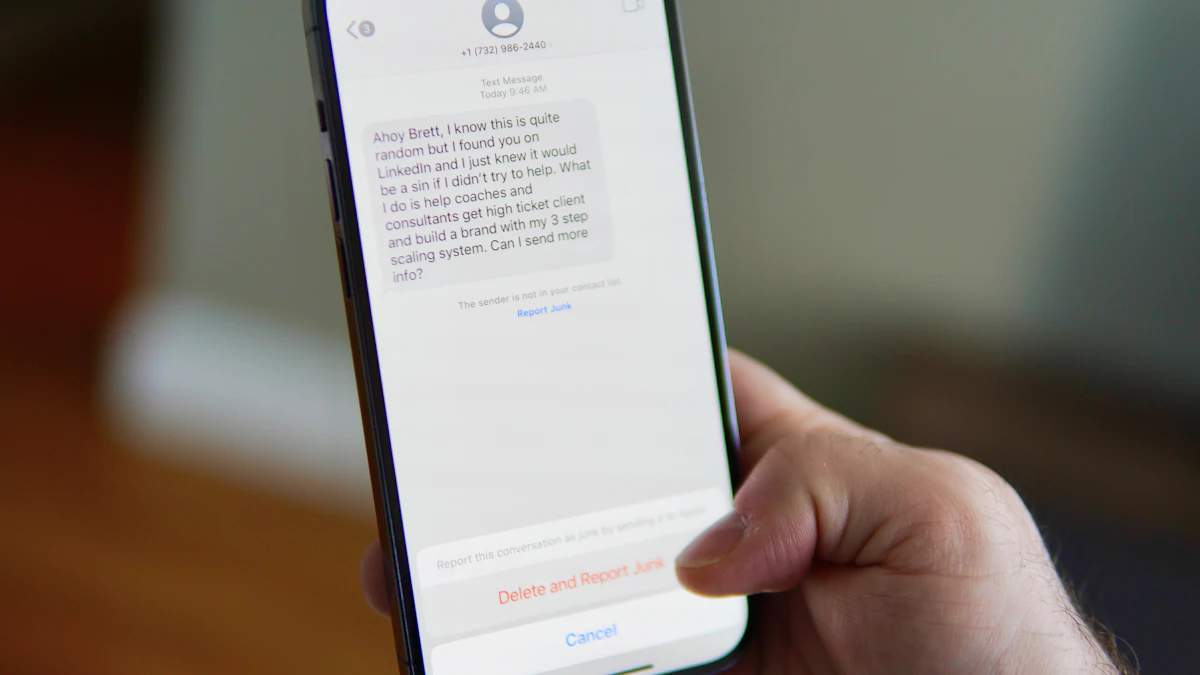
- iPhone: in Messages, tap Report Junk under the message, according to Apple Support. If a text pretends to be from Apple, take a screenshot and email it to reportphishing@apple.com.
- Android with Google Messages: touch and hold the conversation, then tap Block, then Report spam, then OK. Inside a conversation you can also tap More options, then Details, then Block & report spam. Google says this blocks the sender and moves the thread to your Spam & blocked folder.
Report a scam phone number
The FTC splits phone reports into two paths. If you just want to report an unwanted call and lost nothing, use the short form at DoNotCall.gov. If you lost money or know something about who called, report it at ReportFraud.ftc.gov. Either way, include the number that received the call, the caller ID number, any callback number, and the date and time.
Not sure whether a link you tapped did damage? Read what to do after clicking a bad link on your phone.
Stage 3: Report scam emails and websites
- Phishing email: forward it to the Anti Phishing Working Group at reportphishing@apwg.org, as the FTC recommends in its phishing guide. Then delete it.
- Company you actually use: if the email claims to be from your bank or a store where you have an account, contact that company through a phone number or website you already know is real. Never use the contact details inside the suspicious email.
- Scam website: report the page to Google through its Safe Browsing phishing report form, linked from Google Search Help. If the site showed up as a Google ad, Google says to report it through Google Ads support.
If you are still deciding whether an email is fake, our checklist on how to spot a scam email walks through the red flags.
Stage 4: File official reports with the FTC and FBI
ReportFraud.ftc.gov
The Federal Trade Commission collects scam reports at ReportFraud.ftc.gov and shares them with law enforcement. It does not usually step in on single cases, but the data drives investigations and public warnings. One note: during a federal government shutdown, the site has posted a notice that it cannot take reports. If you hit that page, file with the FBI and your state attorney general now and return to the FTC later.
FBI's IC3 for online crimes
The FBI Internet Crime Complaint Center is the main intake point for crimes that happen online, from investment fraud to romance scams. File at complaint.ic3.gov. IC3 tells people to file even if they are unsure whether the case qualifies, and it may refer complaints to federal, state, local or international law enforcement.
Set your expectations. IC3 says it cannot respond directly to every complaint, and it will never contact you asking for information or money. Anyone who calls claiming to be from IC3 and offering to recover your funds is running a second scam.
Other places that fit specific scams
- Mail scams such as sweepstakes, lottery or chain letter fraud: report to the US Postal Inspection Service. Forward fake USPS delivery texts or emails to spam@uspis.gov.
- Your state attorney general: every state has one, and the National Association of Attorneys General keeps a directory at naag.org.
- Local police: call 911 if you are in immediate danger. A police report also helps with bank disputes.
When reporting does not work
Sometimes the bank says no, or a form keeps failing. A few things help.
- The bank refuses a reversal: ask for the decision in writing and ask how to escalate. Keep notes of each call, with the date and the name of the person you spoke to.
- A website will not load: try again later, or use another reporting route from this list. IC3 and your state attorney general work even when the FTC site is down.
- The scam keeps coming: block the number, report each new message, and be wary of anyone promising to get your money back for a fee. The FTC warns that real agencies will never tell you to move money to "protect it."
- It involved a cloned voice of a relative: read our guide on AI deepfake scams aimed at families and set up a family code word.
More safety guides live in our Tech section. One last check before you close this page: save copies of every report confirmation number. You will need them if your bank, insurer or the police ask what you filed and when.
Sources
- FTC: What To Do if You Were Scammed
- FTC: How To Recognize and Report Spam Text Messages
- FTC: Phone Scams
- FTC: How To Recognize and Avoid Phishing Scams
- FBI Internet Crime Complaint Center (IC3)
- Apple Support: Recognize and avoid social engineering schemes
- Google Messages Help: Report spam
- US Postal Inspection Service: Report
- IdentityTheft.gov
- Google Search Help: Report a problem
- NAAG: Find My AG
Share this story
Spotted an error? Tell us