Key takeaways
- A MacBook is the safer single device for most students because it has a built in keyboard and runs full desktop software that some courses require.
- An iPad Air with a $249 Magic Keyboard costs $948 at education pricing before an Apple Pencil, which is more than the $649 MacBook Neo.
- Students who learn by writing by hand, especially in STEM, get the most from pairing a MacBook with a base iPad for notes.
In this story 5 sections
If you can only buy one device for school, the MacBook is the safer choice for most students, and the iPad vs MacBook question mostly comes down to how you take notes. A MacBook runs full desktop software, handles long papers and research with lots of open tabs, and never makes you shop for a keyboard. An iPad wins if you write notes by hand, sketch diagrams, mark up PDFs or study in subjects full of equations, and it works best as a second device next to a laptop.
Prices make the choice sharper than it used to be. At the time of writing (November 2026), Apple's US education store listed the new MacBook Neo from $649, the MacBook Air with M5 from $1,199, the base iPad from $429 and the iPad Air with M4 from $699. Those numbers change during back to school promotions, so check the store before you buy.
The key differences for students
- Typing: every MacBook has a built in keyboard and trackpad. On an iPad, a keyboard is an extra purchase, and the Magic Keyboard for the 11 inch iPad Air was listed at $249 on Apple's education store.
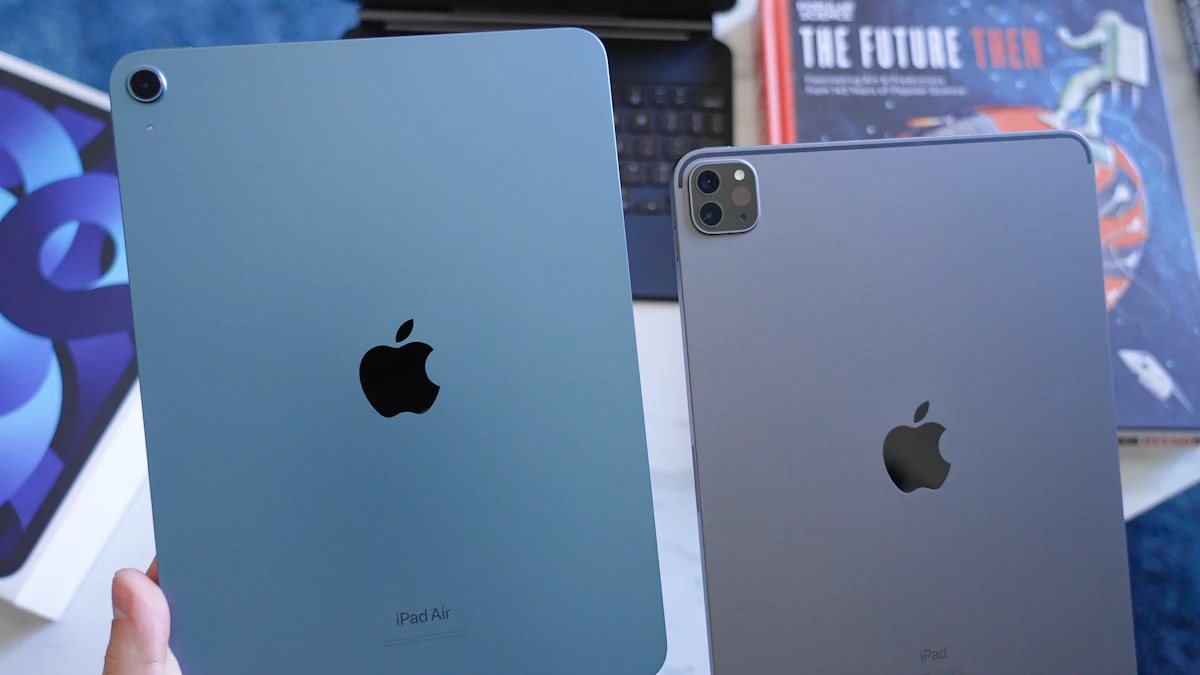
- Handwriting: iPad Air and iPad Pro work with Apple Pencil Pro, and the base iPad works with Apple Pencil (USB-C). No MacBook accepts a stylus.
- Software: macOS runs full desktop apps. iPadOS runs App Store apps, which cover most coursework but not every program a class might require.
- Multitasking: iPadOS 27 brings windowed apps and a menu bar you can keep visible, according to Apple's iPadOS page, but a Mac still handles many windows and file juggling more naturally.
- Weight: the 11 inch iPad Air weighs about 1.02 pounds on its own, while the 13 inch MacBook Air and the MacBook Neo both weigh 2.7 pounds.
- Battery: Apple rates the MacBook Air at up to 18 hours of video streaming and the MacBook Neo at up to 16 hours.
MacBook: the one device that covers every class
A laptop is still what most professors and campus IT departments assume you have. Writing a 15 page paper, keeping a reference manager open beside it, joining a video lecture and submitting through a learning portal all happen without friction on a Mac.
Where a MacBook is strongest
The keyboard is the obvious win. You never have to balance a tablet on a folio case in a lecture hall, and the trackpad makes editing long documents faster than tapping a screen.
Software is the bigger reason. If a course asks you to install a desktop program, run code locally or use a specific browser for online exams, a Mac is far more likely to handle it. Before you buy, look at your program's syllabus or IT requirements page for anything that names macOS or Windows.
You also get a choice of price points now. Apple's MacBook Neo specs list an A18 Pro chip, 8GB of memory, 256GB of storage and a 13 inch display. The MacBook Air specs list the M5 chip, 16GB of memory and 512GB of storage in the models Apple promotes, with 13.6 and 15.3 inch screens. If you are torn between Apple laptops, our MacBook Air vs MacBook Pro comparison goes deeper on that choice.
Where a MacBook falls short
You cannot write on it. For students in math, chemistry, physics or engineering, typing equations is slower than writing them, and many people remember material better when they write it out by hand.
It is also heavier to carry all day than a bare iPad, and it is less handy for reading on the couch or on a bus. Finally, the MacBook Air costs more than an iPad Air at education pricing, so it is not the cheap option unless you pick the Neo.
iPad: the best tool for handwritten notes
An iPad shines in the moments a laptop handles poorly. You can write directly on lecture slides, annotate a PDF reading with a pencil, draw a cell diagram in biology, or flip through flashcards standing in line.
Where an iPad is strongest
Handwriting is the reason to choose it. According to Apple's iPad Air specs, both the 11 inch and 13 inch iPad Air support Apple Pencil Pro and Apple Pencil (USB-C), plus pencil hover. The base iPad supports Apple Pencil (USB-C) and the first generation Apple Pencil with an adapter, but not Apple Pencil Pro.
The iPad Air is also light and fast. Apple lists the M4 chip with 12GB of memory and 128GB of starting storage. That is plenty for note apps, reading, video lectures and light photo or video work.
iPadOS has also grown closer to a laptop. Apple describes windowed apps that you can tile side by side, a menu bar that can stay on screen, and file transfers to external drives that are up to five times faster in iPadOS 27.
Where an iPad falls short
Add a keyboard and a pencil and the price climbs fast. An 11 inch iPad Air at $699 plus a $249 Magic Keyboard comes to $948 before you buy an Apple Pencil, which is more than a MacBook Neo and not far below a MacBook Air.
Software is the second weak spot. Most apps exist on iPad, but some desktop tools, coding setups and exam browsers do not. If even one required class depends on desktop software, an iPad as your only computer will cause problems.
Storage is tighter too. The base iPad and iPad Air both start at 128GB, and offline lecture videos, downloaded readings and photos fill that quickly.
Doing the math on a full setup
Here is what each setup costs at the education prices listed in November 2026:
- MacBook Neo: $649, ready to use.
- MacBook Air with M5: $1,199, ready to use.
- iPad Air 11 inch with Magic Keyboard: $699 + $249 = $948, plus the cost of a pencil.
- Base iPad with a pencil: $429 plus the pencil, with a keyboard extra if you want one.
A popular approach is option 1 plus option 4 later. A MacBook Neo and a base iPad together come to $649 + $429 = $1,078 before accessories, which is less than a MacBook Air alone and gives you both a real keyboard and a writing surface.
Which one to pick for your situation
- Humanities, business and social science majors: get a MacBook. You will write a lot, and a keyboard and full desktop apps matter more than a pencil. Our MacBook vs Chromebook guide helps if you are also weighing cheaper laptops.
- STEM majors who write equations: a MacBook for assignments and code, plus a base iPad for notes, is the strongest pair if your budget allows it.
- Art, design and architecture students: an iPad Air with Apple Pencil Pro is a real drawing tool, but you will likely still need a Mac for desktop creative software.
- Students on a tight budget: the MacBook Neo is the cheapest way into a full Mac. Skip a fully loaded iPad unless handwriting is how you learn.
- High school students: an iPad often covers it, but check whether your school issues or requires a specific device first.
For more options across brands, see our list of the best laptops for college students, and if you plan to lean on study tools, read our guide to using AI for students studying without crossing academic integrity lines. You can find more device comparisons in our Gadgets section.
One last check before you buy: open your course list for the first semester and look for any required software. If anything there needs macOS or Windows, buy the MacBook first and add an iPad only when you know you want to write by hand.
Sources
Share this story
Spotted an error? Tell us